
Hello again. I told you all about my plans to make some notable changes to FreeTube in last weeks blog. This week will be an update on the progress I have made.
As stated in my final Hacktoberfest blog, I attempted this issue briefly when I was looking for a final issue to do for the event. This gives me a head start since I don’t need to locate the code I need to change. Just to make sure though I decided to check the repository for any other mention of keyboard and found one other file was doing stuff with the keyboard, I’ll keep that in mind for latter.
My first step was to make sure I was manipulating the correct code. I commented out the function and it worked! Or, rather, didn’t work as expected. Now it’s time to implement the plugin I found to manage the hotkeys. After running a npm install videojs-hotkes and then including it in the file I’m working on, my first try was just to run it with all the defaults. It works! Now to test out the reason I am using this plugin.
alwaysCaptureHotkeys is this plugin’s way of getting around video-js’ auto-focus accessibility setting. I change the flag to true and add a couple more options that I noticed were not working as wanted hit save and then go back to the app. Now none of the hotkeys are working… Huh, odd. I look over the code, everything seems fine, and I have an auto linter set up so it shouldn’t be a stray letter or something of the sort.
I decided reverted my changes, saved, and went back to the app like I have always done while working on this project. Still nothing. Ok. I shut the app down, then build it again and the hotkeys are enabled again. Great! So I make changes, save, go back to the app, and none of the hotkeys are working again…Ok, I shut down the app, and then build it again, and it works! Apparently I need to close the app and re-build it every-time I make a change this time around. This is very inconvenient since it takes a good minute or two for it to build. All my previous PR’s to the repo allowed me to
build->test->makes changes->save->test->save->test
But now I have to re-build after every save making smaller changes harder to test, but such is life. On the plus side, alwaysCaptureHotkeys kind of works. Now, when the user changes to full screen, the focus still stays on the control bar for accessibility issues. But now, when the control bar auto-hides the focus will return to the video player. This is great! It’s not working exactly as I imagined but it’s an improvement!
Focus on the Document
Now even though I have alwaysCaptureHotkeys enabled the hotkeys still do not work while the video player is not the active element. I noticed that the old hotkeys is called from the document object.
$(document).on('keydown', this.keyboardShortcutHandler)
I also notice that the plugin has an option called documentHotkeysFocusElementFilter , maybe I should add this, but I’m not sure about the implementation. I decided to look through GitHub to see if I could find some code that implements it. There was 9 instances of it, four of them just had them return false. One of the mentions was just in documentation, and then the final three all implemented it, all forks or copys of PeerTube.
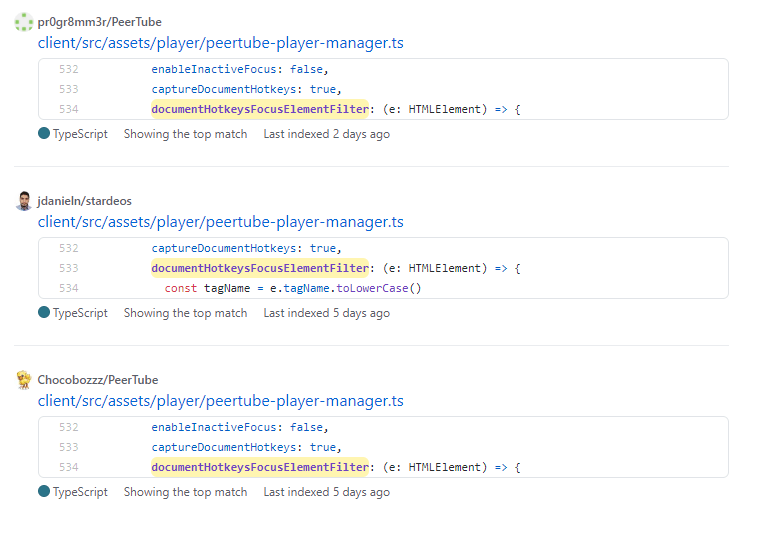
I recreate the example in my code, fire it up, and it kinda of works? I’m getting a lot of odd behavior. Hotkeys work sometimes, sometimes I have to push a button twice, sometimes the ‘m’ key will mute, others it will fast forward the video. Odd.
I went into inspector mode and noticed the code example I used had different id and tag‘s then what FreeTube had set up.
 documentHotkeysFocusElementFilter: (e) => {
    const tagName = e.tagName.toLowerCase()
    return e.id === 'app' || tagName === 'videoarea'
 }
I changed the code to better match the containers and it worked! Again, not fully as expected but it not works if the focus is off of the player. Huzzah!
Replicating the old hotkeys
Now it’s time to start replicating the functionality of the old hotkeys function. Since I was still getting some undefined behavior I looked at the old function to maybe get some guidance. I noticed that before every function call they event.preventDefault(), maybe that’s my issue.
Instead of using their default options I wanted to try out overloading some of the buttons that they have set up.
          playPauseKey: (event) => {
            event.preventDefault()

            // 'Space Bar'
            return event.which === 32
          },
It worked again, and much more consistently. There are still some issues but maybe sorting the rest of it out will iron out the kinks. I look at the old function and notice they have multiple hotkeys set up for different tasks.
          playPauseKey: (event) => {
            event.preventDefault()

            // 'Space Bar' or 'k'
            return event.which === 32 | event.which === 75
          },

          rewindKey: (event) => {
            event.preventDefault()

            // 'j' or 'left arrow'
            return event.which === 74 | event.which === 37
          },

          forwardKey: (event) => {
            event.preventDefault()

            // 'l' or 'right arrow'
            return event.which === 76 | event.which === 39
          }
Great, that all works now as expected! There is still some functionality left but that will have me implementing custom hotkeys rather than using the defaults or built in overloads.
The Last Step before the PR
Next step to adding the rest of the functionality is to create some custom hotkeys using the plugins built it customkeys: property.
          customKeys: {
            decreasePlaybackRateKey: {
              key: (event) => {
                return event.key === 'o'
              },
              handler: () => {
                event.preventDefault()
                this.changePlayBackRate(-0.25)
              }
            },
The above is code makes the ‘o’ key decrease the playback rate by 25%. I ran into an issue at first where it didn’t work. Thanks to my experience with FreeTube I quickly noticed that the this is not the this I want to be calling. I need to use the this that represents the player and not the plugin. After making that change I fired it back up at it worked, I could decrease the playback rate with the o button. Now that I know it works, time to add the rest of the hotkeys.
            increasePlaybackRateKey: {
              key: (event) => {
                return event.key === 'p'
              },
              handler: () => {
                event.preventDefault()
                v.changePlayBackRate(0.25)
              }
            },

            toggleCaptionsKey: {
              key: (event) => {
                return event.key === 'c'
              },
              handler: () => {
                event.preventDefault()
                v.toggleCaptions()
              }
            },

            previousFrameKey: {
              key: (event) => {
                return event.key === ','
              },
              handler: () => {
                event.preventDefault()
                v.framebyframe(-1)
              }
            },

            nextFrameKey: {
              key: (event) => {
                return event.key === '.'
              },
              handler: () => {
                event.preventDefault()
                v.framebyframe(1)
              }
            }
The majority of the hotkeys now work, but there is still some issues. It would seem no matter what I try I cannot get the mute hotkey to work. I tried three different ways and none of them want to work. Then there’s the issue of the hotkeys not always working. Like, sometimes ill have to push a button twice, or it will perform it’s default behavior instead of the overridden one. I think it might have to do with the documentHotkeysFocusElementFilter property I talked about earlier.
If I have learned anything from this course is that I should not be afraid to ask for help. I have a good idea what the issue is, and the PR is probably 90% there, so I am going to do what I did last time. I am going to create a PR, label it a draft, and outline my issue. Hopefully someone will be able to lend a hand like they did last time! Stay tuned for my finale installment next week which will detail the review process of my PR.
 Tim's Blog for DPS 909