This is it, the final PR for Hacktoberfest! I really like FreeTube and after spending so much time with FreeTube for the last PR I decided to continue my work with them.
I had a couple of issues I was considering taking on. This one was about fixing a keyboard shortcut. It just so happened to be located in the file I worked on from the last PR so I was already kind of familiar with it. I spent some time fiddling around with it but my first few ideas didn’t work out, and according to a comment in the issue , the wanted behavior may not be possible without changing the video.js API, which a member doesn’t seem to keen on doing.
The other issue I was looking at and finally decided to go with was an enhancement to change the title of the application to be the title of the video being watched. Should be easy enough, just got to search for the title elements. After using the inspector and the VS search function I figured I found out where the titles were being set.
<!DOCTYPE html>
<html>

  <head>
    <meta charset="utf-8" />
    <meta name="viewport"
          content="width=device-width, initial-scale=1.0" />
    <link rel="manifest" href="static/manifest.json" />
    <title></title>
    <% if (htmlWebpackPlugin.options.nodeModules) { %>
    <script>
      require('module').globalPaths.push(
        `<%= htmlWebpackPlugin.options.nodeModules.replace(/\\/g, '\\\\') %>`
      )
    </script>
    <% } %>
  </head>
The file was a .ejs file. I had to look up what that was, and it turns out it’s a template system. Makes sense since I noticed in the inspector that the html format stayed the same expect for a couple different pieces while I was navigating. OK, so I noticed there is no actual title in the title tag, but maybe the title is generated from the script linked above it?
After following the trail the script took me on I found out that is a script for an API that uses yt-dl which has been custom built for use in FreeTube. Looking at the repo for a bit I decided that it likely wasn’t going to solve my issue. Back to the code, and what I probably should have done in the first place, was test out to see if I could manipulate the title. So I added my own text to the title and nothing changed. OK, I then tried getting rid of the title all together, still no change… hmmmm, this probably isn’t the place I want to be.
Another search brought me to router/index.js where I found a bunch of component vue’s with their title attribute being set.
 {
      path: '/channel/:id',
      meta: {
        title: 'Channel',
        icon: 'fa-user'
      },
      component: Channel
    },
    {
      path: '/watch/:id',
      meta: {
        title: 'Watch',
        icon: 'fa-user'
      },
      component: Watch
    }
Perfect! This should allow me to manipulate the title. Sure enough after changing the text of the title my changes showed up in the application. Great! now I just need to figure out how to get the video title from the Watch component or video-info.js file into this router file. After reading a ton of documentation on Vue I was still left confused as to how i should go about this. I put out the call for help in the slack channel and RayGervais was kind enough to offer some help. His solution had me adding another dependency which I wanted to avoid, but it did lead me into another possible solution.
After some time trying to implement that latest idea, and having it not work I finally decided that it would be a good time to get assigned this issue. Maybe I could ask for some direction from the owner. After the owner assigned me I asked if he was ok with me using Ray’s purposed solution by implementing Vue-meta. The owner told me that it shouldn’t be necessary and all that I had to do was update the document.title object.
Hmmm, really, that’s it? I had my doubts but I tried it out and a console.log showed me it was working… Only problem now is that the title isn’t displaying the new value. Luckily I came across this issue while I was looking into other solutions for this and all I had to do was add some code to simulate a reload of the page.
    updateTitle: function () {
      document.title = `${this.videoTitle} - FreeTube`

      // simulates a reload to update the title after fetching it
      this.$router.go({
        path: this.$router.path,
        query: {
          t: +new Date()
        }
      })
    },
Vue does lazy loading so since the document.title was the only thing to change it does not fully refresh the page, but just the title.
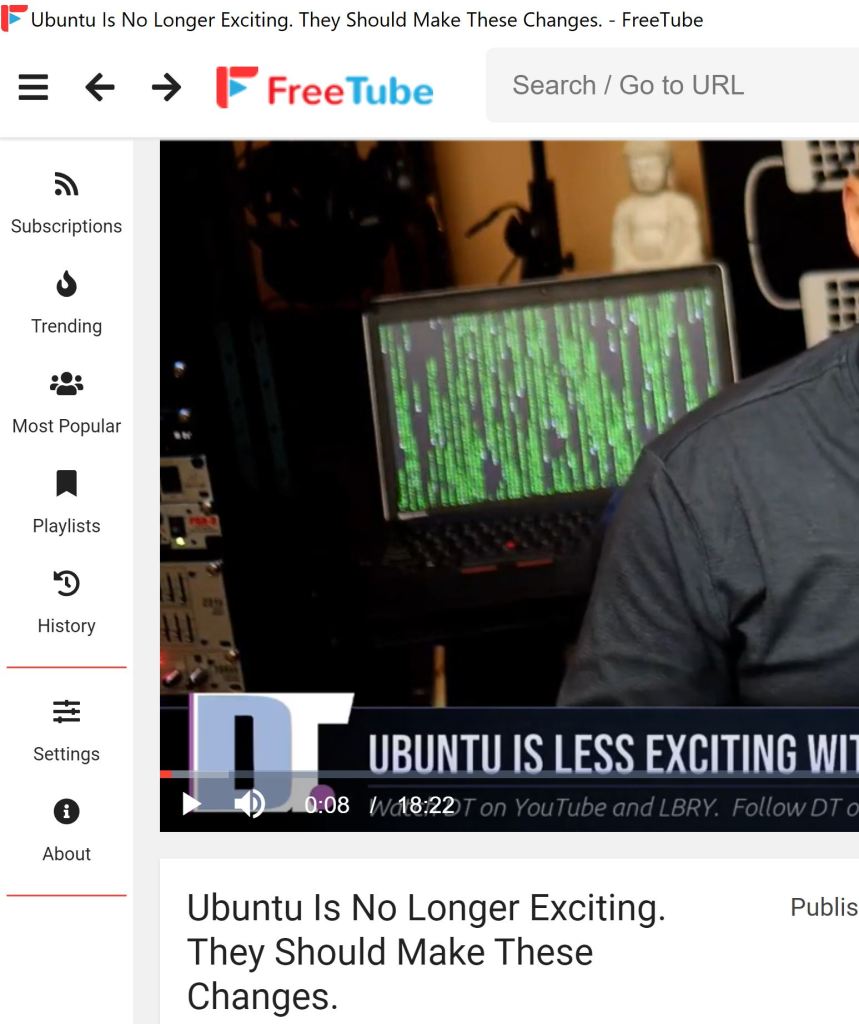
I then had some issues with my branches but I eventually figured it all out and submitted my fourth Hacktoberfest PR!
 Tim's Blog for DPS 909